Setting up ServiceTitan zones for AI CSR booking functionality
Last updated: December 17, 2025
In order for the AI CSR to book jobs in your ServiceTitan system, you must have zones configured. Zones are required because they tell the AI CSR which areas you service and allow it to properly schedule appointments.
Why zones are required
Without zones set up in ServiceTitan, the AI CSR has no way to determine which geographic areas your business services. This prevents it from being able to book jobs for customers calling from different locations.
How to set up zones in ServiceTitan
Click Add Zone (or equivalent “Add” action in the Zones screen).
Enter:
Zone name (ex: “North”, “Downtown”, “Zone 1”)
Zone color (useful for visual indicators on boards/schedules)
ZIP codes or Cities included in that zone
ServiceTitan supports the asterisk character when setting up zones, which allows you to define ranges of ZIP codes efficiently.
For example, if you service East Texas with ZIP codes 75601–75999, you can set up the East Texas zone with this range in your zone configuration.
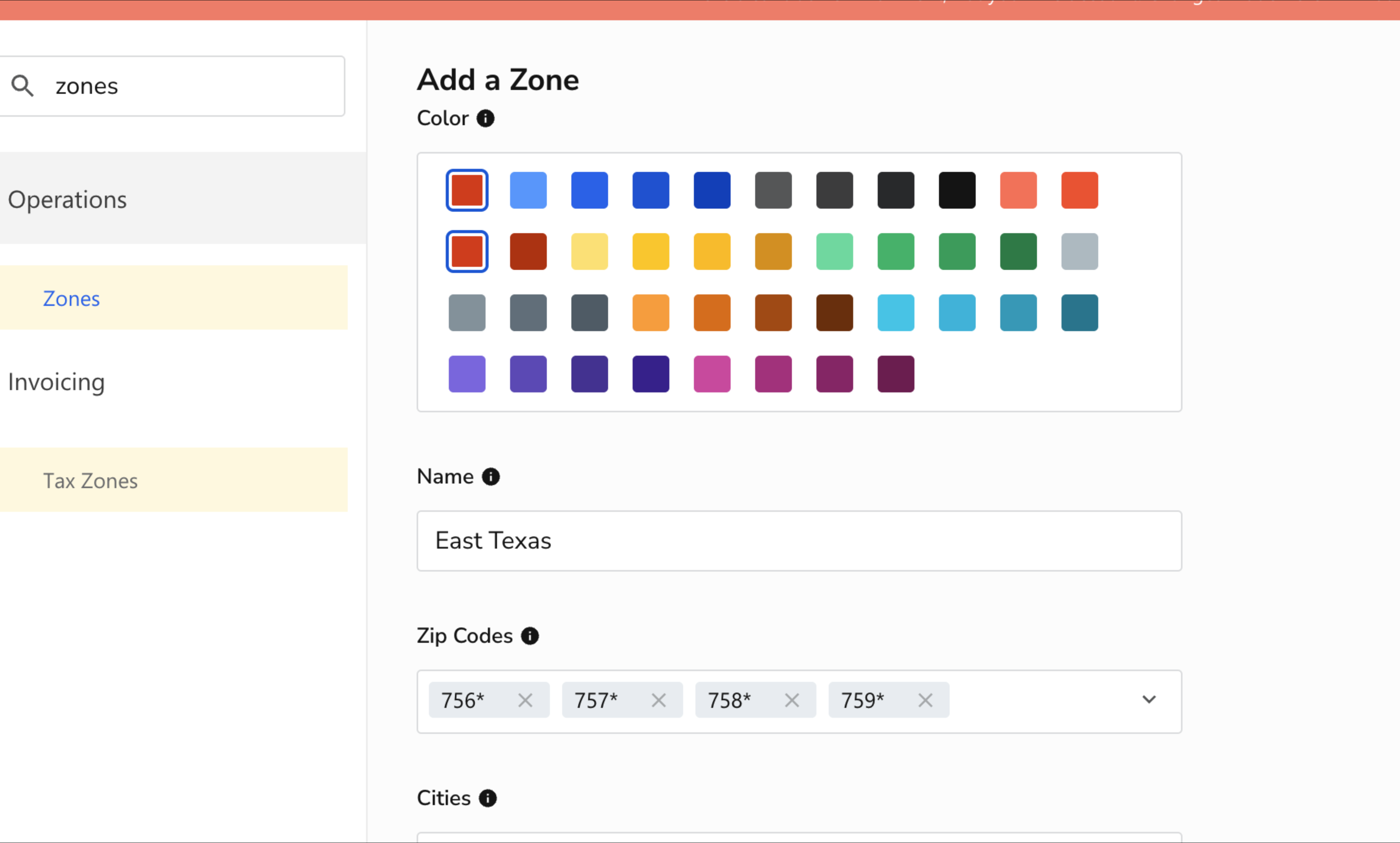
For detailed instructions on creating zones, refer to the ServiceTitan zones documentation.
Additional zone information needed
After setting up your zones, make sure to inform the Lace team about any zones that have additional charges (such as extra service fees) so the AI CSR can be configured with this pricing information.