Enabling Business Unit Zone Matching in ServiceTitan (Multi-Brand or BU by Zone Setup)
Last updated: January 30, 2026
When setting up your Lace AI CSR in a ServiceTitan tenant that works with Business Unit by Zone mapping, one important configuration is required:
Business Unit Zone Matching
This ensures that when Lace is booking jobs, the correct Job Type ↔ Business Unit is selected automatically based on the customer’s service area.
Why This Matters
In multi-brand ServiceTitan environments, different business units often serve different:
Zip codes
Cities
Service territories
Job types
For Lace AI CSR to schedule accurately, ServiceTitan must allow Zones to be mapped directly to Business Units.
Once enabled, your CSRs (and Lace) will see the appropriate Business Units automatically during job booking.
Step 1 — Ask ServiceTitan Support to Enable BU Zone Matching
This feature is not always turned on by default.
Please reach out to ServiceTitan Support and request that they enable:
Business Unit Zone Matching
Once enabled, your Zone setup screen will allow Business Units to be assigned to each service area.
Step 2 — Assign Business Units to Zones
After the feature is enabled, you can configure it in just a few clicks.
Navigate to Zones
Go to:
Settings → Zones
This is where ServiceTitan manages service areas by:
Zip codes
Cities
Regions
Add Business Units to Each Zone
In the Zones table, you will be able to assign the appropriate Business Units for each service territory.
Example view:

For each Zone (e.g., Corpus Christi, Kingsville, Rockport), you can specify which Business Units apply.
Step 3 — CSR Experience During Job Booking
Once configured, your CSR team will see the correct Business Units available automatically when scheduling as well as enabling the AI CSR to book with the correct business unit.
For example, ServiceTitan will surface Business Units grouped by matching zip codes:
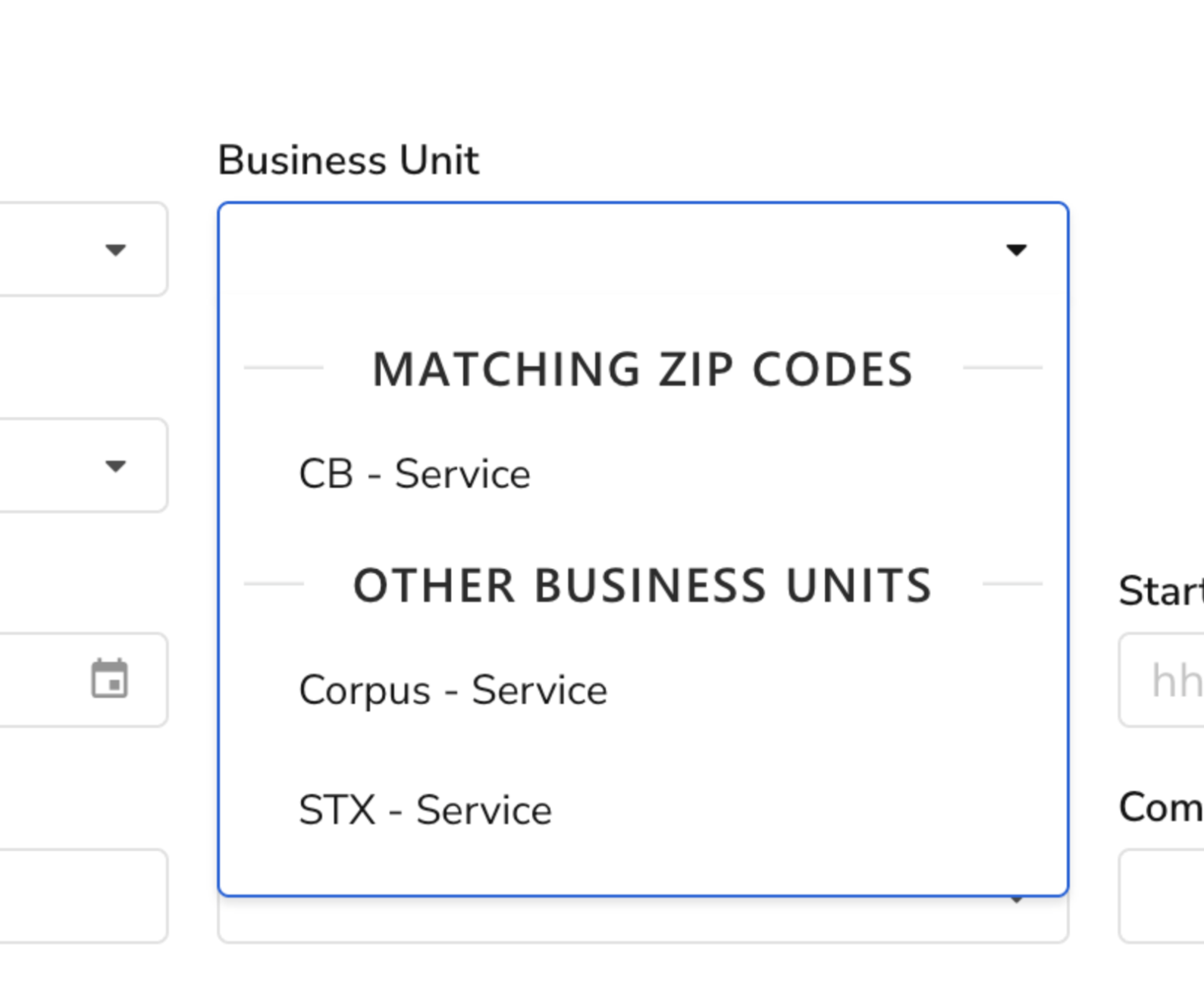
This makes it very easy for both:
Human CSRs
Lace AI CSR
to choose the right Business Unit every time.
Summary
To support accurate scheduling in a multi-brand ServiceTitan tenant, we recommend enabling Business Unit Zone Matching.
Quick checklist:
✅ Ask ServiceTitan Support to enable BU Zone Matching
✅ Go to Settings → Zones
✅ Assign the correct Business Units to each Zone
✅ Lace AI CSR will now book jobs into the correct BU automatically
Need Help?
If you’d like, Lace can guide your team through the setup or validate that Zones and Business Units are configured correctly before go-live.
Just reach out to your Lace onboarding contact or support@lace.ai